Introduction
Core concepts are an expression of a project‘s underlying data model and relationships, translated into a written format that the team can build an aligned understanding upon. This data-centric view is bolstered by conversations with relevant subject matter experts to create a cohesive picture of the world the product operates in.
The benefits of a Core Concepts document
- It serves as an alignment reference between design, engineering, and the business. E.g. when stakeholders say “we want a product that does X”, this artefact is a way of playing back “We, the designers/developers/product-people interpret that as Y. Let’s make sure we are aligned”.
- It provides designers with an understanding of how the product will work from a back-end point of view, and paves the way for designs that minimise gaps between the desired user experience and the system’s inner workings.
- It can help add specificity to scope, and inform what the delivery team does, and doesn’t need to factor in to its plans.
- It can be a useful aid to engineers, as a bridge into, and out of, a database schema.
People & participants
We’ve found that the core concepting process is best led by a Technical Architect – they’re the person most capable of obtaining a detailed view on how the project’s underling data will need to be structured.
It’s often a good idea to include a Design Lead or UX Designer in support to help inform how the data structures might overlap with any pre-existing mental models that the users and business might hold. The designer can also help fast-track the documentation process in parallel.
Instructions
Preparation
Familiarise yourselves with the subject matter in advance of interviews so you’re not starting from a blank slate. This can be done by reviewing any current versions of the product, existing docs, or researching adjacent products in the marketplace.
Method
- Create a new document in a place where the team and stakeholders can easily access it.
- Conduct interviews with any relevant subject matter experts (SMEs) and stakeholders.
- Use these sessions to extract knowledge and information about the subject matter.
- We’ve found that recording these sessions is useful to refer back to later on.
- Decide on the criteria by which a core concept should, or should not be captured.
- Create a sub-section (or sub-page) for each concept using the following template to properly describe them
- Overview - An overview of the relevant subject matter
- Relationships - An expression of the GraphQL schema, describing the fields that point between objects
- Entities - An expression of the GraphQL schema, listing and describing the related object types that make up each object
- Status - The different states the object can have
- Other detailed concepts - Other relevant information
- Questions - A space for the Architect or Designer to note down questions and get responses from the stakeholders
- Repeat the sessions and refine the documentation until the team agrees that what has been captured provides enough detail to design and build from (with the understanding that some amount of detail will need to be worked through later on).
Applying Core Concepts to new and legacy projects
Core concepts plays a vital role when embarking upon new projects. In situations like these its value as an aligner is elevated because you need to sufficiently resolve a picture of the core concepts that not only deliver on short term requirements, but are resilient and as future-proof as possible. Getting the fundamental concepts and their relationships to match the mental model of the domain you’re building within will help to reduce expensive rewrites down the track.
If you’re working within the constraints of an existing system in an existing team, it’s usually still worthwhile running the play if such a document does not exist. it’s easy to think that the value may be somewhat diminished. However, as consulting engineers and designers coming in from outside, we’ve found that running the play often surfaces hidden assumptions and misalignments which greatly benefits outcomes if they’re identified early in the project.
Visualising Core Concepts
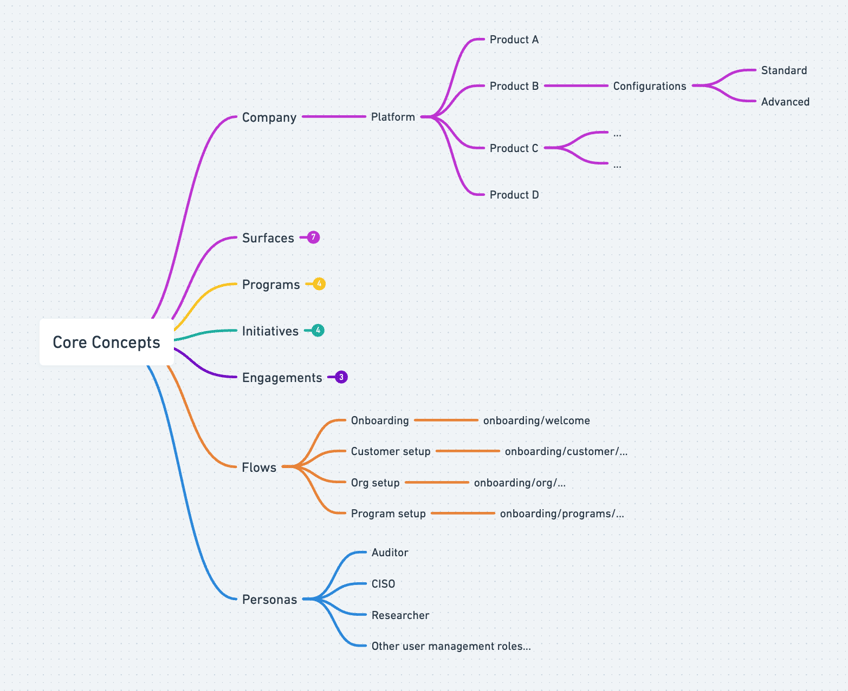
We’ve found that capturing core concepts in text to be the most universally accessible medium through which to collaborate and align on. However, this doesn’t mean you shouldn’t use other forms of representation. You may find you have a lot of visual thinkers on your team who would be benefit from seeing the concept space in a graph-like format. If that’s the case, things like mind maps, and entity relationship diagrams can be a nice complement to what you get down in writing.